

Software is a guidance program that gives the orders to the computer or electronic device for any action. It assists the users to perform different works , such as browsing the net , writing documents, watching videos, and playing games.
Software is not a component of a computer like software . It operates the hardware to make a computer function properly. For example, Windows, Google Chrome, Microsoft Word, and Photoshop are common software programs.
System software is a type of software that manages computer hardware and provides a platform for running other programs. It controls important computer operations, including memory allocation , document storage , and communication between hardware devices.
Every kind of function helps computers work effectively . It controls all running programs in memory management . System software works in the background and helps the computer operate properly. Without it, users could not find application programs or control computer hardware.
What Are the Three Main Types of Software?
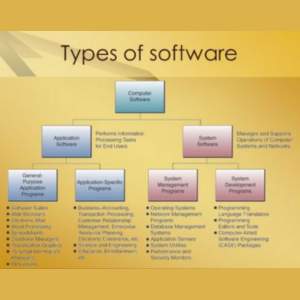
There are three main types of software: system software, application software, and programming software.
Examples
- Microsoft Windows
- Linux
- macOS
- Android
- Device Drivers
- These examples show how system software manages hardware and supports other applications.
What Is Application Software?
Application software is a sort of computer program and it’s designed to support the consumers performing specific tasks. It authorized the people to complete their daily activities, like writing documents, editing photographs, sending emails, watching videos, and browsing websites. Application software is commonly used in education, business, communication, and entertainment.
Examples
Application software accessible for computers, smartphones, and tablets. Some common examples include:
- Microsoft Word
- Google Chrome
- Microsoft Excel
- Adobe Photoshop
- VLC Media Player
What Is Programming Software?
Programming software is a multiple tool that supports the software developers write, test, debug, and maintain computer programs. It creates a support system where programmers make applications, websites, and other software products.
In this environment developers use programming software to write instructions in programming languages such as Python, Java, C++, and JavaScript.
Some programming tools like code editors, compilers, interpreters, and debuggers. Using these tools developers find errors, improve code, and build software for different devices.
Examples
- Visual Studio Code is a code editor for writing and managing programming code.
- PyCharm is a built- in development environment (IDE) that is used for Python .
- Eclipse is a development environment and creates Java and other applications.
- GCC a compiler where convert source code into executable programs.
- Python Interpreter requires the Executes Python code for computers performing .
What Is System Software?
System software is a type of software that controls the computer hardware and provides a forum for managing the other programs. It controls important computer operations that have memory management, file management, and communication between hardware devices.
System software operates the background and helps the computer to work properly. Without using the system software, users can not find or run application programs or control computer hardware.
Example :
There are several examples of system software that help computers and other devices work correctly.
- Microsoft Windows
- Linux
- macOS
- Android
- Device Drivers
How Does Software Work?
Software gives the instructions to computer hardware. When consumers open a program , the software sends instructions to the computer’s processor. The processor observes these instructions and performs the obligatory task.
For example, when you open a web browser, the software interacts with the operating system and hardware to display websites. Software uses memory and safety to process and save information.
How to Use Software Applications?

Software applications are programs that are designed to help users perform specific tasks on computers, laptops, tablets, and smartphones. These applications create daily activities in an easy ,quicker , and managed way. Users use the software applications for writing documents, browsing the internet ,image editing , watching videos, expressing with others, and controlling the business activities.
For software applications, you need to install the application on your device. In application software you can find its menus, buttons, and available features. Software applications have a simple interface that is not difficult to perform tasks without new technical knowledge.
Example:
Suppose you want to use Microsoft Word for writing and editing documents, create spreadsheets in Microsoft Excel, calculate data, and Google Chrome for searching information . Similarly, other applications like WhatsApp and Zoom help people to cheat with messages, voice calls, and video meetings. It is easy for beginners to use different software applications and in this way users can improve their computer skills.
Here are some basic steps for using software applications:
- Download the software from a reliable source or open the installed application.
- Create an account for using features.
- Explore the features for using different menus, buttons, and tools.
- Perform your tasks using the application for your work that you need .
- Save your work such as files and documents to save the information.
- Update the application to improve security, fix errors, and access new features
What Is Open-Source Software?

Open-source software is software whose code is publicly open for people to observe , study, adjust , and share it with its license terms. It authorized developers and users to understand how this program works .
Some popular examples of open source software Linux, Mozilla Firefox, VLC Media Player, and LibreOffice. These are very helpful for encouraging collaboration, flexibility, and innovation. So members need to check the software license and security before installing a program.
What Is the Difference Between Software and Hardware?
These are two important components of a computer system. Hardware and software refers to users who can see and touch. While software relates to the programs and instructions that tell the hardware for next to do.
For example, a keyboard, monitor, mouse, and processor are hardware components. Windows, Google Chrome, and Microsoft Word are software programs.
Why Is Software Important in Everyday Life?
Software plays an important role in everyday life. We work with software on computers, smartphones, tablets, and other electronic devices for multiple tasks like communication, education, business, and entertainment it is helpful for people to complete tasks quickly and easily.
Example :
Students use educational applications to discover new skills, businesses use accounting software to handle finances, and people use messaging applications to communicate with friends and family.
Software plays an important role in healthcare, banking, transportation, and online shopping. Its workflow improves productivity, manages information, and makes daily activities .
Conclusion
Software is a group of programs ,command and collection of data that tell the computer devices how to implement the particular work . Such as hardware that provides the physical elements to the computer and software is a non-physical that operates the background . Software is an important part of the computer that plays an important role in our daily life like smartphones and computers that manage the businesses and through this you can access the online system.
There are three basic types of softwares System software like like Windows, macOS, Linux, Android, iOS , hardware driver and functionality .Application software ( Word processors ,Web browsers like Google Chrome, Firefox ,Media players and mobile applications in it include Business software like accounting, CRM tools .Programming software examples are Compilers GCC, Java,Interpreters, Code editors, IDEs .